Key takeaways
- Five 12-bay NAS units compared for photo archives, from desktop towers to 2U rackmount models with ECC memory, fast networking and room to grow.
A photography archive grows in one direction only, and the real decision is how many years of RAW files, layered edits, video from the same shoots and delivered galleries one chassis should hold before you are forced into a second box. Twelve bays let you open with a handful of drives, keep empty slots in reserve, and still have a single volume to back up and search.
This roundup serves working photographers consolidating a career of shoots onto one machine, small studios sharing a single library between several desks, and archivists who need rack hardware with redundant power. Every model below was picked from Amazon listings and their stated specifications: bay layout, processor, memory and network ports, never from marketing roundups or bundle configurations.
Quick Picks
As an Amazon Associate we earn from qualifying purchases
| Product | Best for | Key spec from title |
|---|---|---|
| Synology DiskStation DS2422+ | Solo photographers growing one deep archive | 12-bay desktop, quad-core CPU with 4GB memory |
| TERRAMASTER T12-500 Pro | Editing large files straight off the NAS | 12-bay, Core i7 10-core CPU, dual 10GbE ports |
| QNAP TVS-h1288X | Studios that want ZFS data integrity | 12 bay (8 x 3.5-inch and 4 x 2.5-inch), Xeon W-1250 |
| QNAP TS-1273AU-RP | Rack rooms that need redundant power | 12-bay 2U rackmount, 2 x 2.5GbE, redundant PSU |
| Synology RackStation RS2423+ | Rackmount archive with built-in 10GbE | 12-bay 2U rackmount, Ryzen V1780B, 8GB ECC memory |
How to Choose
Count usable bays, not just total bays
A 12-bay chassis rarely ends up holding twelve archive drives. Most photographers leave one or two slots empty for a hot spare or the next expansion, and some layouts split the bays: the QNAP TVS-h1288X, for example, pairs eight 3.5-inch bays with four 2.5-inch bays meant for SSDs. Decide your drive plan first, how many large hard drives form the main pool today and how many slots stay free, then check the listing’s bay sizes match that plan, because a 2.5-inch bay will never accept the 3.5-inch drives an archive usually runs.
Match network speed to how you actually edit
Gigabit networking moves roughly a hundred megabytes per second, which is fine for nightly ingest and browsing but slow when a Lightroom catalog pulls previews across the wire all day. Units with 2.5GbE or 10GbE ports, such as the TERRAMASTER T12-500 Pro with dual 10GbE, only pay off if your switch and workstation have matching ports. Check the listing’s port list against your existing network gear before valuing a faster headline speed you cannot use yet, and remember that several slower ports can sometimes be aggregated into one faster logical link for a single busy workstation.
Give the processor and memory real headroom
An archive NAS does more than serve files. It indexes thumbnails, runs photo library software, verifies checksums and handles several users at once. Listings state the processor and memory plainly: the DS2422+ ships with 4 GB of ECC memory, while the TVS-h1288X carries 16 GB. If you plan to run containers, a media server or multiple studio seats, favour the stronger processor and confirm from the listing whether memory can be expanded later, since a chassis you keep for a decade will outgrow its shipping memory long before it outgrows its bays.
Plan protection before capacity
Twelve bays invite one huge volume, which is exactly where a single failure hurts most. Look for the protection features named in the listing and its documentation: ECC memory that catches data errors, snapshot support for rolling back a damaged catalog, and, on rack models like the TS-1273AU-RP, redundant power supplies. Decide your RAID layout and snapshot schedule on paper first, then confirm the enclosure you buy supports both without extra licences or hardware, and note which models let an expansion unit join the same protected volume later on.
The 5 Best Options
Synology DiskStation DS2422+

The DS2422+ is the straightforward desktop choice for a photographer whose archive has outgrown scattered external drives. Its twelve hot-swappable bays let you open with four or six drives in a protected array and add more as shoots accumulate, and Synology’s DSM software handles photo libraries, shared folders and scheduled snapshots in one interface. Four Gigabit ports can be aggregated for several users, and a single expansion unit doubles the chassis to twenty-four bays when the first twelve fill.
Specs
- Drive bays: 12 x 3.5-inch SATA, hot-swappable
- CPU: AMD Ryzen V1500B quad-core 2.2 GHz
- Memory: 4 GB DDR4 ECC SODIMM, expandable to 32 GB
- Network: 4 x 1GbE RJ-45 ports
- Expansion: up to 24 bays with one DX1222 expansion unit
- Form factor: desktop
Best for: a solo photographer or two-person studio consolidating years of RAW files into one expandable desktop archive.
Watch out for: the listing is diskless, so confirm your chosen drives appear on Synology’s compatibility list before ordering, since this series enforces drive validation.
ASIN: B09JNRPK2Z
TERRAMASTER T12-500 Pro

Where the archive doubles as a working drive, the T12-500 Pro brings the strongest desktop hardware in this group. Its listing names a Core i7 processor with ten cores, 16 GB of DDR5 memory and dual 10GbE ports, a combination aimed at editors opening large layered files directly from the NAS and at studios running backup or media services alongside storage. Twelve SATA bays accept hard drives or SSDs, so a mixed pool of bulk drives plus a fast SSD tier sits in one tower.
Specs
- Drive bays: 12 x 2.5-inch or 3.5-inch SATA (HDD or SSD)
- CPU: Intel Core i7-1255U, 10 cores and 12 threads
- Memory: 16 GB DDR5 RAM
- Network: dual 10GbE ports
- Included storage: diskless
- Form factor: desktop tower
Best for: photographers and small studios editing directly from the archive over a 10GbE network.
Watch out for: dual 10GbE only helps if your switch and workstation also carry 10GbE ports, so confirm your network path before counting on the headline speeds.
ASIN: B0DB2NHVWV
QNAP TVS-h1288X
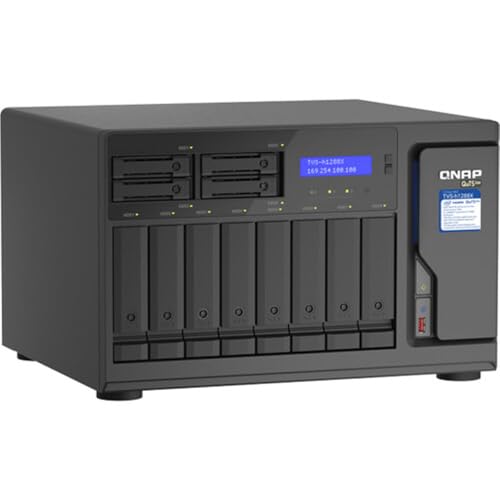
The TVS-h1288X runs QNAP’s QuTS hero system, built on the ZFS file system with self-healing checks that suit an archive meant to survive for decades. Its front panel splits twelve bays into eight 3.5-inch slots for bulk hard drives and four 2.5-inch slots for SSDs, with two M.2 NVMe slots for cache on top. A six-core Xeon processor, ECC memory and six network ports, two of them 10GbE, give it the headroom to serve a busy studio while integrity checks run in the background.
Specs
- Drive bays: 8 x 3.5-inch SATA and 4 x 2.5-inch SATA, hot-swappable
- CPU: Intel Xeon W-1250 6-core 3.3 GHz
- Memory: 16 GB DDR4 ECC RAM, expandable to 128 GB
- Network: 2 x 10GbE and 4 x 2.5GbE RJ-45 ports
- M.2 slots: 2 x M.2 22110/2280 NVMe PCIe Gen3 x4
- Operating system: QuTS hero (ZFS-based)
Best for: studios that rank bit-level archive integrity and SSD tiering above a simple setup.
Watch out for: listing evidence for this model is older than for the others here, so confirm a live offer on this exact ASIN before ordering.
ASIN: B08LD4189S
QNAP TS-1273AU-RP

Studios with a proper rack should look at the TS-1273AU-RP, a 2U unit whose twelve 3.5-inch bays sit behind redundant power supplies, so one failed supply never takes the archive offline. The listing pairs a quad-core Ryzen processor with 8 GB of memory and two 2.5GbE ports, and two PCIe slots leave room for a faster network card later. It is a plainer machine than the desktop towers here, which is the point: steady file service for a shared catalog, ingest station and office backup in one rack box.
Specs
- Form factor: 2U rackmount
- Drive bays: 12 x 3.5-inch SATA 6Gb/s
- CPU: AMD Ryzen Embedded V1500B quad-core 2.2 GHz
- Memory: 8 GB DDR4
- Network: 2 x 2.5GbE RJ-45 ports
- Power: redundant power supplies
- Expansion: 2 x PCIe Gen3 slots
Best for: a studio or small office with rack space that needs the archive to stay up through a power supply failure.
Watch out for: listing snapshots behind this ASIN are dated, so confirm a live offer on the exact TS-1273AU-RP-8G-US model before ordering.
ASIN: B08FM9WDN7
Synology RackStation RS2423+

The RS2423+ puts Synology’s DSM software into a 2U rack chassis with twelve bays and a built-in 10GbE port, which makes it the natural rack pick for photographers already settled into Synology’s photo and backup tools. Its Ryzen processor runs at 3.35 GHz, the fastest base clock in this group, and the 8 GB of ECC memory can grow to 32 GB. Two Gigabit ports handle everyday traffic while the 10GbE connection feeds the editing desk, and expansion units can double the bay count.
Specs
- Form factor: 2U rackmount
- Drive bays: 12 x 3.5-inch SATA HDD or 2.5-inch SATA SSD
- CPU: AMD Ryzen V1780B quad-core 3.35 GHz
- Memory: 8 GB DDR4 ECC UDIMM, expandable to 32 GB
- Network: 2 x 1GbE and 1 x 10GbE RJ-45 ports
- Operating system: Synology DSM
Best for: rack-based studios that want DSM photo management plus one fast 10GbE link to the editing workstation.
Watch out for: two ASINs circulate for this model, so confirm the listing shows a live offer for the diskless RS2423+ itself, and check whether rack rails are included or separate.
ASIN: B0BWT1P8YV
Which One Fits Your Situation
One photographer, one growing archive, no rack
Choose the Synology DiskStation DS2422+. It sits quietly on a desk or shelf, opens with a partial set of drives, and expands to twenty-four bays with a single expansion unit, so the archive you build this year is still the archive you use in ten years. DSM’s photo tools keep a large library browsable without extra software.
The archive is also your working drive
Pick the TERRAMASTER T12-500 Pro if your switch and workstation already run 10GbE, or the QNAP TVS-h1288X if SSD tiering matters more. Both carry processors and memory well beyond file serving, so previews render and catalogs open from the NAS itself instead of a local drive that then needs its own backup.
Long-term integrity matters more than simplicity
The QNAP TVS-h1288X is the deliberate choice here. Its ZFS-based QuTS hero system checks data as it is written and read, the ECC memory guards the path in between, and the split bay layout keeps an SSD tier beside the bulk pool. Accept the steeper setup in exchange for an archive built to detect its own errors.
The studio already has a rack and shared users
Either rackmount unit fits; the decision is power against networking. The QNAP TS-1273AU-RP brings redundant power supplies for uptime, while the Synology RS2423+ brings a built-in 10GbE port and DSM’s software. Match the pick to what your room lacks: backup power resilience, or a fast link to the editing desk.
Common Mistakes
- Buying a 12-bay expansion unit such as a DX1222 on its own, expecting a NAS; expansion units only add bays to a compatible head unit and hold no processor or network ports.
- Filling all twelve bays on day one, leaving no slot for a hot spare or for the larger drives you will want in three years.
- Building one giant volume with no snapshot schedule, so a corrupted catalog or accidental deletion replicates everywhere instantly.
- Editing over a single Gigabit connection and blaming the NAS for slow previews, when the network link is the bottleneck.
- Treating the NAS as the only copy of the archive; twelve bays of RAID still need a separate backup, ideally off site.
Frequently Asked Questions
Can I edit photos directly from a 12-bay NAS?
Yes, provided the network keeps up. Browsing and culling work over Gigabit, but editing large RAW or layered files feels responsive on 2.5GbE or 10GbE models such as the T12-500 Pro and RS2423+. Your switch and workstation need matching ports, and an SSD tier or cache inside the NAS smooths preview-heavy work further.
How many drives should I install at the beginning?
Enough for your current archive plus a few years of growth, arranged with at least one drive’s worth of redundancy. Leaving several bays empty is normal with a 12-bay chassis: you can add matching drives later, and free slots give you room for a hot spare and for gradual capacity upgrades.
Is a desktop or rackmount enclosure better for a home studio?
Desktop towers like the DS2422+ and T12-500 Pro are simpler: no rack, shorter cables, and fans voiced for rooms people sit in. Rackmount units such as the RS2423+ make sense when a rack already exists or redundant power matters. Both shapes hold the same twelve drives, so choose by room and noise, not capacity.
Does a 12-bay NAS replace my backup?
No. RAID and snapshots protect against drive failure and accidental deletion inside the box, but not against theft, fire or a failure of the whole unit. Keep a second copy of the archive on separate media, with one copy away from the studio, and let the NAS be the fast working copy.