Key takeaways
- Five Thunderbolt RAID enclosures for photo archives compared: diskless OWC towers, populated SanDisk systems and a Promise legacy unit, plus backup advice.
A photography archive has two enemies: a dead drive and a slow one. Wedding and client work piles up in terabytes, and the enclosure holding it has to combine real capacity, a fast Thunderbolt connection and redundancy that survives a failed disk. The five units below split into two honest camps: diskless enclosures you populate yourself, and populated systems that arrive with drives installed and a RAID level already set.
This guide is for working photographers and serious hobbyists building a primary archive or a fast working store next to the editing desk. Picks were chosen from their Amazon listings for bay count, stated RAID modes, interface and stated transfer speeds, and each entry says plainly whether drives are included. One popular USB-C enclosure was deliberately left out: despite the connector shape, its listing is USB, not Thunderbolt, and it does not belong in this comparison.
Quick Picks
As an Amazon Associate we earn from qualifying purchases
| Product | Best for | Key spec from title |
|---|---|---|
| OWC ThunderBay 4 | Diskless four-bay flexibility | Thunderbolt 3 with SoftRAID, sold 0TB |
| OWC ThunderBay Flex 8 | Mixed HDD and NVMe archive growth | 8 bays with U.2 NVMe and SATA, sold 0TB |
| SanDisk Professional G-RAID Mirror 16TB | Set-and-forget mirrored archive | Populated 16TB, RAID 1 as listed |
| SanDisk Professional G-RAID Shuttle 4 72TB | Huge turnkey capacity for studios | Populated 72TB, RAID 5 out of the box |
| Promise Pegasus32 R4 16TB | Populated four-bay with RAID 6 option | 16TB as 4x 4TB drives, RAID 0/1/5/6 |
How to Choose
Diskless or populated: decide who chooses the drives
A diskless enclosure costs less up front and lets you pick drive models, capacities and replacement spares yourself, but the drives are a separate purchase and the first build is your job. A populated system arrives with drives installed and, in the Shuttle’s case, a RAID level already configured, which suits studios that bill by the shoot rather than the hour. Neither route is cheaper in total once drives are counted. Decide by who maintains the archive: if that is you, diskless flexibility usually wins; if it is nobody, buy the populated box.
Pick the RAID level for an archive, not for speed
For photographs you cannot reshoot, redundancy beats raw speed. RAID 1 mirrors everything onto a second drive and is the simple choice in a two-bay unit. RAID 5 spreads data and parity across four drives, so one disk can fail without losing the archive, and RAID 6 tolerates two failures. RAID 0 appears in these listings and is fast, but it has no redundancy at all and a single failed drive takes the whole set with it. Choose the level by how much failure you must survive, then check the listing states that level for the exact model.
RAID is not a backup
RAID protects against one thing only: a drive failing at an inconvenient moment. It does not protect against deletion, theft, fire, a corrupted file system or a controller failure, because the array faithfully mirrors or stripes your mistakes as fast as your work. Keep the archive in at least one more place, ideally a separate drive stored away from the desk and a copy off site or in cloud storage. The enclosures below are the fast, resilient front line of an archive; the backup behind them is what makes the archive safe.
Speed claims: interface first, drives second
Every pick here connects over Thunderbolt 3 at 40Gb/s, and two add a USB-C fallback at 10Gbps for machines without Thunderbolt. The headline speeds in the listings, up to 1527MB/s for the ThunderBay 4 and 2750MB/s for the Flex 8, assume fast drives in a striped set; a four-bay of spinning disks in RAID 5 will run far below those figures, and the populated G-RAID Mirror is listed at up to 250MB/s read in RAID 1. Judge an archive by sustained, redundant throughput with your drives, not by the striped best case in the title.
The 5 Best Options
OWC ThunderBay 4

The ThunderBay 4 is the default starting point for a self-built archive. This listing is the 0TB diskless version, so you supply four drives and build the array in the included SoftRAID software, which the listing states supports RAID 0, 1, 4, 5, 1+0 and JBOD. Dual Thunderbolt 3 ports let it sit in a daisy chain with a monitor or dock, and the listing’s sustained figure of up to 1527MB/s reflects fast drives in a striped set rather than a redundant one. Photographers who already own drives, or want to choose them, get the most control here.
Specs
- Bays: 4, sold 0TB / diskless in this listing
- Interface: Thunderbolt 3, 40Gb/s, dual Thunderbolt 3 ports
- RAID: Software RAID via included SoftRAID Premium; listing states RAID 0/1/4/5/1+0 (10)/JBOD
- Speed: Up to 1527MB/s sustained, per listing copy
- Manufacturer part: TB3SRKIT0GB
Best for: Photographers who own drives or want to choose them and build their own RAID 5 archive.
Watch out for: It ships without drives, and RAID is handled in software by SoftRAID rather than a hardware controller.
ASIN: B079KR2JVM
OWC ThunderBay Flex 8

The Flex 8 is the growth option: eight bays in one Thunderbolt 3 chassis, split between four SATA and NVMe U.2 bays and four SATA bays, so an archive of spinning disks and a fast NVMe working set can live in the same box. It is also part dock, with built-in docking connectivity, a PCIe expansion slot and 85W host charging from the listing. RAID runs through the included SoftRAID Premium; note that the retrieved listing copy does not enumerate RAID levels for this model, so confirm the level you need in the software before committing drives to it.
Specs
- Bays: 8, sold 0TB / diskless in this listing
- Bay mix: 4x SATA/NVMe U.2 plus 4x SATA, per listing-derived copy
- Interface: Thunderbolt 3
- Speed: Up to 2750MB/s, per listing copy
- RAID: Software RAID via included SoftRAID Premium (3 Year); listing copy does not enumerate levels
- Extras: Docking connectivity, PCIe expansion slot, 85W host charging
Best for: Studios outgrowing four bays who want archive disks and fast NVMe working storage in one unit.
Watch out for: It is diskless and physically ambitious; budget for drives, and verify your intended RAID level in SoftRAID first.
ASIN: B089Y58J4Z
SanDisk Professional G-RAID Mirror 16TB

The G-RAID Mirror is the set-and-forget pick. This listing is populated: 16TB of capacity on 7200RPM Ultrastar drives already installed in a two-bay desktop unit, connected over Thunderbolt 3 with a USB 10Gbps option. The listing copy states RAID 1 mirroring, which means every photograph is written to both drives, and lists up to 250MB/s read in that mode. For a solo photographer whose archive fits the mirrored capacity, it removes the build-it-yourself step entirely: plug it in, and the redundancy most people actually need is already the configuration.
Specs
- Bays: 2, populated with drives installed; this listing is the 16TB version
- Drives: 7200RPM Ultrastar hard drives
- Interface: Thunderbolt 3 plus USB (10Gbps)
- RAID: RAID 1 mirroring, as stated in the listing copy
- Speed: Up to 250MB/s read in RAID 1, per the listing title
- Model: SDPHH2H-016T-NBAAD
Best for: Solo photographers who want mirrored redundancy with no drive shopping or array building.
Watch out for: Two bays cap your growth, and mirroring means half the headline capacity is the copy, so plan the size around that.
ASIN: B0CH219TF2
SanDisk Professional G-RAID Shuttle 4 72TB
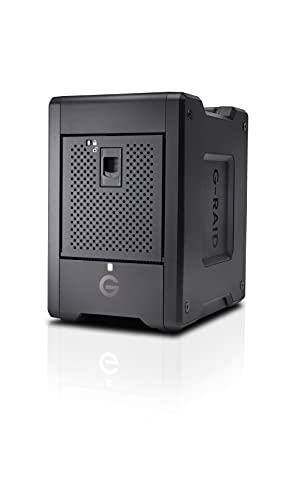
The Shuttle 4 is the turnkey studio vault. It arrives populated with 72TB of enterprise-class 7200RPM Ultrastar drives in a transportable four-bay chassis, configured as RAID 5 out of the box, with the listing stating support for RAID 0, 1, 10 and JBOD if you rebuild it. Dual Thunderbolt 3 ports allow daisy-chaining, and a USB-C 10Gbps connection covers machines without Thunderbolt. For a studio ingesting whole wedding seasons or commercial archives, it trades the flexibility of a diskless build for capacity that works the day it lands.
Specs
- Bays: 4, populated; this listing is the 72TB version
- Drives: Enterprise-class 7200RPM Ultrastar drives
- Interface: Thunderbolt 3 (40Gbps) and USB-C (10Gbps), dual Thunderbolt 3 ports
- RAID: Hardware RAID; RAID 5 out of the box, supports 0, 1, 10 or JBOD per listing copy
- Form factor: Transportable desktop unit
- Model: SDPH34H-072T-NBAAB
Best for: Studios that need very large, ready-to-run redundant capacity for whole-season archives.
Watch out for: It is a large, heavy populated system built for studio-scale archives; smaller libraries will not use what it offers.
ASIN: B097C7L5QF
Promise Pegasus32 R4 16TB
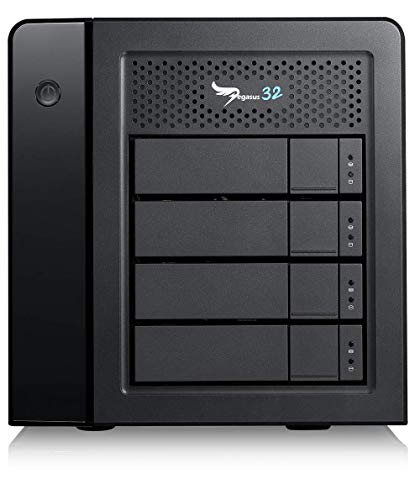
The Pegasus32 R4 is the established name in this category, sold here populated with 16TB as four 4TB SATA drives. Its listing offers Thunderbolt 3 or USB 3.2 connection with DisplayPort 1.4, and Promise’s copy states RAID 0, 1, 5 and 6, which makes it the only pick here listing dual-parity RAID 6. The honest caveat is age: Pegasus32 is Promise’s legacy line, replaced at the top by a Thunderbolt 4 range, and channel stock of this 16TB version has been thin, so verify the listing is live and orderable before choosing it.
Specs
- Bays: 4, populated; 16TB as 4x 4TB SATA drives in this listing
- Interface: Thunderbolt 3 or USB 3.2, per the listing title; DisplayPort 1.4
- RAID: RAID 0/1/5/6, per Promise copy in the listing material
- Model: P32R4HD16US
Best for: Mac-based studios that want a populated four-bay with a RAID 6 option from an established line.
Watch out for: End-of-line risk: the Pegasus32 line is legacy and stock of this version has been thin, so spot-check the live listing first.
ASIN: B081121ZKX
Which One Fits Your Situation
Your archive is small but irreplaceable
Choose the G-RAID Mirror. A two-bay mirrored unit is the least complicated way to survive a drive failure, and because it arrives populated and configured as RAID 1, there is no array to build and nothing to misconfigure. Pair it with one separate backup drive kept away from the desk, and a solo photographer’s archive is genuinely protected rather than merely stored in a fast box.
You already own good drives
Choose the ThunderBay 4. It is sold diskless precisely for this situation, so your existing 3.5-inch drives drop into four bays and SoftRAID builds the level you want, with RAID 5 the natural archive choice. You also control the spares strategy, since a failed disk can be replaced with the same model you already trust. Just confirm your drives are matched in capacity before building the set.
Your studio ingests whole seasons at once
Choose the G-RAID Shuttle 4. Seventy-two terabytes populated and running RAID 5 out of the box means a wedding season or a year of commercial work lands on redundant storage immediately, without a weekend spent building arrays. Its transportable chassis also suits studios that move the archive between locations. Keep a second copy elsewhere, because even a big RAID is still a single point of failure for everything except a dead disk.
You are planning a decade of growth
Choose the ThunderBay Flex 8. Eight bays, a mix of SATA and NVMe U.2, and docking built in mean the archive can grow by adding drives instead of replacing the enclosure, while a fast NVMe set handles current-year work. The PCIe slot and host charging extend its desk life further. Because it is diskless, stage the drive purchases: start with a redundant set for the archive and expand as the library grows.
Common Mistakes
- Treating RAID as a backup and keeping the only copy of client work inside one enclosure.
- Buying a USB-C enclosure and assuming the connector means Thunderbolt speeds; the interface in the listing is what counts.
- Choosing RAID 0 for an archive because the striped speed figure in the title looked impressive.
- Mixing drive capacities in one set, then discovering the array sizes itself to the smallest disk.
- Ordering a diskless enclosure and forgetting that drives, and the time to build the array, are still ahead of you.
Frequently Asked Questions
Is RAID a backup for my photo archive?
No, and the distinction matters. RAID keeps the archive online when a drive fails, which is valuable, but it mirrors deletions and corruption just as faithfully, and it cannot help after theft or fire. Keep at least one separate copy on a different device, ideally with another copy stored off site or in cloud storage, and let the RAID enclosure be the fast working layer of that system.
What is the difference between diskless and populated?
Diskless means the enclosure ships empty: the ThunderBay listings here are 0TB, and you buy and install the drives yourself. Populated means drives are installed at the stated capacity, as with the 16TB G-RAID Mirror and the 72TB Shuttle 4. Diskless gives you drive choice and easier growth; populated gives you a working archive on day one. Always check which kind a listing is before comparing capacities.
Which RAID level suits a photography archive?
For most archives, RAID 5 in a four-bay unit is the balanced choice: one drive can fail, the array keeps working, and you lose only one disk’s worth of capacity to parity. RAID 1 suits two-bay units and smaller archives for its simplicity. RAID 6 adds a second parity disk for very large sets. Avoid RAID 0 for anything you cannot recreate, because it offers no failure protection at all.
Why do some USB-C enclosures not qualify here?
Because the connector is not the interface. USB-C is a plug shape; the connection behind it can be Thunderbolt at 40Gb/s or USB at 10Gbps, and at least one eight-bay enclosure that looks like a Thunderbolt unit is USB-only in its listing. For an archive you intend to edit from, that difference decides whether the enclosure belongs in this comparison at all, so check the interface line, not the port.