Key takeaways
- Best 6K computer monitors for photo editing compared: 6K resolution, wide gamut color, factory calibration, and Thunderbolt connectivity for photo work.
A 6K monitor changes the way a photo editing session feels. With 6016 by 3384 or 6144 by 3456 pixels on a 32-inch panel, a single image holds far more detail than a 4K panel can show, and the extra pixel density makes fine textures, hair, fabric, and distant foliage resolve cleanly instead of turning soft at full zoom. Toolbars, panels, and a histogram can sit beside the image without crowding it, so the canvas stays large while the editing controls stay in view. For photographers who spend hours a day in front of a screen, that combination of sharpness and working room is the main reason to step up to 6K.
Color matters just as much as resolution. A monitor built for photo work pairs its 6K panel with a wide color gamut, stable brightness, and factory calibration, so the image on screen stays close to the file that leaves the editor. The three monitors in this guide all state 6K resolution in their listings, and each one brings a different balance of color coverage, brightness, and connectivity. One is a creator-focused panel with strong calibration credentials, one is a newer Thunderbolt 5 panel with broad gamut coverage, and one is a reference-class display built around extreme brightness and contrast. None of them is a gaming panel, and none of them is a 4K or 5K panel dressed up with a 6K label. Every model below lists 6K resolution as its native resolution.
What to Look For
Resolution and pixel density come first. A true 6K monitor states 6016 by 3384 or 6144 by 3456 pixels in its listing. At 32 inches, that works out to roughly 218 to 224 pixels per inch, which is dense enough that individual pixels disappear at a normal viewing distance and fine detail stays crisp when zooming to 100 percent. Be wary of any listing that calls itself 6K without giving the pixel count, since a few panels use the label loosely.
Panel type shapes the image. All three monitors here use IPS-class panels, which hold color and contrast steady across a wide viewing angle. That matters when leaning in to inspect a corner of an image or when a second person looks over a shoulder at the screen. A panel with a matte or anti-glare finish also helps in a bright room, since it keeps window light from washing out shadow detail.
Gamut coverage decides how much of a scene the monitor can show. Look for a listing that names DCI-P3 or Adobe RGB coverage, since those wide gamuts hold the deep reds, greens, and cyans that a narrow gamut clips away. A monitor that covers a wide DCI-P3 gamut will show saturated landscape and portrait tones that a standard gamut panel flattens. Adobe RGB coverage matters more for print work, since that gamut maps closely to what a high-end printer can reproduce.
Calibration is the quiet spec that separates a creator monitor from an office monitor. A factory-calibrated panel ships with its color output tuned at the factory, and a listing that states a Delta E figure below 2 is telling buyers that color error is small enough to be hard to see. Hardware calibration support, where the monitor stores a calibration profile in its own memory, is a bonus for anyone who recalibrates on a regular schedule.
Brightness and contrast set the ceiling for highlight and shadow work. A monitor with 600 nits of peak brightness under a DisplayHDR 600 certification holds highlight detail in bright scenes, while a reference-class panel with 1000 nits sustained and 1600 nits peak goes further for HDR photo work. Contrast ratio matters too: a panel with a 2000 to 1 contrast ratio shows deeper blacks than a panel with a 1000 to 1 figure, and a panel with local dimming zones can push contrast far higher by dimming dark areas independently.
Connectivity decides how clean the desk stays. A single Thunderbolt cable that carries video, data, and laptop charging keeps the setup to one cable, and Thunderbolt 4 or Thunderbolt 5 both serve that role. HDMI 2.1 and DisplayPort 2.1 cover desktop connections, while a built-in USB hub keeps a card reader, a calibrator, and a backup drive close at hand. Check the power delivery figure on the Thunderbolt port if a laptop is the main machine, since a port that delivers 96 watts will charge most laptops while they work.
Ergonomics and build round out the list. Height, tilt, swivel, and pivot adjustment let the panel sit at eye level, and a VESA mount pattern keeps the door open for an arm or a wall mount later. A three-year warranty is common on creator monitors and signals that the maker stands behind the panel.
ASUS ProArt Display PA32QCV
ASUS ProArt Display 32-Inch 6K Professional Monitor PA32QCV

The ASUS ProArt Display PA32QCV is the creator-focused pick in this guide, and its listing leads with the specs photo editors care about. It is a 32-inch IPS panel with 6K resolution at 6016 by 3384 pixels, which works out to 218 pixels per inch. That density keeps fine detail sharp at full zoom and makes small text in editing panels easy to read without scaling the interface up.
Color is where this monitor earns its place. The listing states a wide DCI-P3 gamut, a Delta E figure below 2, and Calman Verified status, which means the panel ships with its color output tuned and checked at the factory. For photo work, that combination means skin tones, foliage, and product colors land close to the file, and the panel needs little adjustment out of the box. The LuxPixel anti-glare coating on the screen cuts reflections in a bright room, so shadow detail stays visible even with a window behind the desk.
Brightness carries a DisplayHDR 600 certification, which puts its peak brightness at 600 nits. That is enough headroom for highlight detail in bright outdoor images and for HDR photo work, while the IPS panel holds contrast steady across the viewing angle. The 60 Hz refresh rate is standard for a creator monitor and suits still-image work, where motion smoothness is not the priority.
Connectivity centers on Thunderbolt 4, which carries video, data, and laptop charging over a single cable. That one-cable link suits a laptop-based editing setup, since the monitor can charge the machine while it drives the display. The panel also carries HDMI and DisplayPort inputs for desktop machines, and the listing notes a three-year warranty.
The PA32QCV is the most approachable of the three monitors here for a photographer moving up from a 4K panel. It pairs genuine 6K resolution with factory-tuned color and a matte screen, and its Thunderbolt 4 link keeps a laptop desk tidy. Its main limits are the ones shared by most creator panels: a 60 Hz refresh rate and a brightness ceiling below the reference-class panel in this guide. For still-image editing, neither limit gets in the way.
LG UltraFine 32U990A-S
LG 32U990A-S 32-Inch UltraFine 6K Nano IPS Black Thunderbolt 5 Professional Monitor
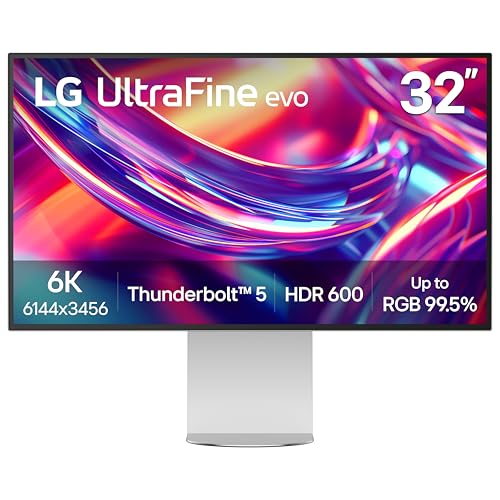
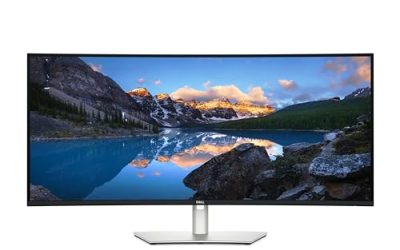
The LG UltraFine 32U990A-S is the newest panel in this guide, and it brings Thunderbolt 5 to a 6K creator monitor. Its 32-inch Nano IPS Black panel states 6144 by 3456 pixels, which works out to 224 pixels per inch, the highest density of the three monitors here. That extra density shows up when inspecting fine detail at 100 percent zoom, where hair, fabric weave, and distant texture stay crisp.
Gamut coverage is broad. The listing and LG material describe coverage of both Adobe RGB and DCI-P3, which covers the two gamuts photo editors care about most: Adobe RGB for print work and DCI-P3 for wide-gamut screen work. Native 10-bit color supports smooth gradients, so a clear sky or a soft studio backdrop renders without visible banding. The Nano IPS Black panel technology also lifts contrast above a standard IPS panel, giving deeper blacks in shadow-heavy images.
Brightness carries a DisplayHDR 600 certification, matching the ASUS panel at 600 nits peak. That is enough for highlight detail in bright scenes and for HDR photo work, while the matte panel finish keeps glare under control in a bright room. The 60 Hz refresh rate is standard for a creator monitor and suits still-image work.
Connectivity is the headline feature. Thunderbolt 5 carries video, data, and up to 96 watts of laptop charging over a single cable, and the monitor also provides HDMI 2.1, DisplayPort 2.1, and USB-C ports. That port set covers a laptop, a desktop, and a second device without a separate dock. Built-in speakers handle casual audio, and the included stand adjusts for tilt, height, and pivot, so the panel can turn to portrait for a vertical crop check.
The 32U990A-S suits a photographer who wants the newest connection standard and the broadest gamut coverage in one panel. Its Thunderbolt 5 link and 96-watt charging make it a strong single-cable hub for a laptop, and its Nano IPS Black panel gives it a contrast edge over a standard IPS panel. The main thing to confirm before buying is that the machine driving it can use Thunderbolt 5 or at least fall back cleanly to an earlier Thunderbolt or USB-C link.
Apple Pro Display XDR Standard Glass
Apple 32-Inch Pro Display XDR with Retina 6K Display Standard Glass

The Apple Pro Display XDR is the reference-class monitor in this guide, and its listing reads like a specification sheet for a studio display. It is a 32-inch LCD panel with Retina 6K resolution at 6016 by 3384 pixels, which works out to 218 pixels per inch. The P3 wide color gamut covers the saturated tones that matter for portrait and landscape work, and the panel is built for color-critical use rather than general office work.
Brightness is where this monitor separates itself from the other two. The listing states 1000 nits of sustained full-screen brightness and 1600 nits at peak, with a 1,000,000 to 1 contrast ratio driven by 576 local dimming zones. Those figures matter for HDR photo work, where the monitor must hold bright highlights and deep shadows in the same frame without one washing out the other. For a photographer working with HDR images, that brightness and contrast headroom is the main reason to consider this panel.
The panel uses standard glass, which keeps the image as sharp as the panel allows. A nano-texture glass variant exists with a matte finish that cuts glare, but it is a separate listing with its own model number, so buyers should confirm which glass finish the listing they open actually shows. The Pro Stand and the VESA Mount Adapter are sold separately, which means the monitor arrives without a stand in the box. That is an important detail to catch early, since the panel needs either the Apple stand or a VESA mount to sit on a desk.
Connectivity covers the Apple ecosystem well, with Thunderbolt support for a Mac, and the 60 Hz refresh rate suits still-image work. The panel is aimed squarely at Mac-based studios, and it pairs naturally with a MacBook Pro or a Mac Studio. Its limits are its weight, its need for a separately purchased stand, and its position as the most demanding panel here in terms of the machine driving it. For a photographer already working on a Mac and editing HDR images, it is the most capable display in this guide.
Comparison Table
| Monitor | Resolution | Panel | Gamut | Brightness | Connectivity |
|---|---|---|---|---|---|
| ASUS ProArt PA32QCV | 6016 x 3384 (6K) | IPS, 218 PPI | Wide DCI-P3, Delta E below 2 | DisplayHDR 600 | Thunderbolt 4, HDMI, DisplayPort |
| LG UltraFine 32U990A-S | 6144 x 3456 (6K) | Nano IPS Black, 224 PPI | Adobe RGB and DCI-P3, 10-bit | DisplayHDR 600 | Thunderbolt 5, HDMI 2.1, DisplayPort 2.1, USB-C |
| Apple Pro Display XDR | 6016 x 3384 (6K) | IPS, 218 PPI | P3 wide color gamut | 1000 nits sustained, 1600 nits peak | Thunderbolt |
Frequently Asked Questions
Is 6K worth it over 4K for photo editing?
For most photo editors, the jump from 4K to 6K is about working room and fine detail rather than a dramatic change in how an image looks at normal size. A 6K panel shows more of an image at 100 percent zoom, which makes it easier to check focus, noise, and fine texture without panning around the frame. It also leaves more room for toolbars and panels beside the canvas. A photographer who crops heavily, works with high-resolution files, or spends long sessions inspecting detail will feel the difference every day. A photographer who mainly exports for the web may find a good 4K panel sufficient, but the extra pixels and density of 6K are hard to give up once they become familiar.
Do I need a Mac to use a 6K monitor?
No. All three monitors in this guide connect to Windows machines as well as Macs, through Thunderbolt, HDMI, or DisplayPort. A Mac pairs naturally with these panels, and the Apple Pro Display XDR is aimed squarely at Mac-based studios, but the ASUS and LG panels work with either system. The main thing to confirm is the connection on the computer side: a Thunderbolt port gives the cleanest single-cable setup with charging, while HDMI 2.1 and DisplayPort 2.1 cover desktop machines that lack Thunderbolt. A machine with only an older HDMI port may not drive 6K at 60 Hz, so the graphics output on the computer deserves a check before buying.
What should I confirm before buying a 6K monitor for color work?
Confirm four things. First, the listing should state 6K resolution with the pixel count, either 6016 by 3384 or 6144 by 3456, since a few listings use the 6K label loosely. Second, look for a named gamut such as DCI-P3 or Adobe RGB, and a Delta E figure below 2 if the listing states one, since those figures signal a panel tuned for color work. Third, confirm the glass finish and what ships in the box: the Apple panel in this guide ships without a stand, and a nano-texture variant is a separate listing. Fourth, confirm the cable and port on the computer side, since a 6K signal at 60 Hz needs Thunderbolt, HDMI 2.1, or DisplayPort 2.1. A monitor that passes all four checks will serve a photo editing desk well for years.
How to Choose
Choose the ASUS ProArt PA32QCV if the priority is factory-tuned color at a creator-friendly position. Its Delta E below 2 figure, Calman Verified status, and LuxPixel anti-glare coating make it the most ready-to-work panel of the three, and its Thunderbolt 4 link suits a laptop desk. It is the natural pick for a photographer moving up from a 4K panel who wants 6K resolution and trustworthy color without changing the rest of the setup.
Choose the LG UltraFine 32U990A-S if the priority is the newest connection standard and the broadest gamut coverage. Its Thunderbolt 5 link, 96-watt laptop charging, and Nano IPS Black panel give it the most modern port set here, and its coverage of both Adobe RGB and DCI-P3 covers print work and screen work in one panel. It is the natural pick for a photographer building a new desk around a laptop, where a single cable should carry video, data, and charging.
Choose the Apple Pro Display XDR if the priority is reference-class brightness and contrast for HDR photo work. Its 1000 nits sustained and 1600 nits peak brightness, with a 1,000,000 to 1 contrast ratio from 576 local dimming zones, go beyond what the other two panels can show in highlights and shadows. It is the natural pick for a Mac-based studio already editing HDR images, with the understanding that the stand is a separate purchase and the panel is the most demanding of the three in terms of the machine driving it.
Whichever panel fits the desk, confirm the exact listing before buying: the pixel count, the gamut named in the listing, the glass finish, and what ships in the box. A 6K monitor is a long-term tool for a photo editing desk, and the right one is the panel whose resolution, color, and connectivity match the way the work actually gets done.
Disclosure: As an Amazon Associate, we may earn a commission from qualifying purchases made through links in this article, at no additional cost to you.