Key takeaways
- Three 6-bay NAS enclosures for photography archives, chosen from Amazon listing titles and specs for RAW libraries, shared studio access and room to grow.
A photography archive fails in a quiet way long before a drive does. Years of RAW files sit scattered across portable drives, a finished wedding lives on one disk while its second copy lives on another, and finding a five-year-old shoot becomes a search through labelled boxes rather than a search box. A six-bay network enclosure changes that habit because every shoot can sit in one named place the whole studio reaches over the network, with empty bays left for the years still to come.
This guide is for working photographers, small studios and serious hobbyists whose libraries have outgrown single drives and who want one archive at the centre of the edit desk, the office machine and a laptop. Every model below was picked from the name and specifications on its own Amazon product page, and each is a six-bay network attached storage enclosure, sold without drives, so drives you already trust can start the library fresh.
Quick Picks
As an Amazon Associate we earn from qualifying purchases.
| Product | Best for | Key spec from title |
|---|---|---|
| Synology 6 bay NAS DiskStation DS1621+ (Diskless) | A settled, single-purpose archive that simply holds the library | 6 bay NAS, Diskless |
| UGREEN NASync DXP6800 Pro 6-Bay Desktop NAS | Studios that also want fast network ports and local display output | 2X 10GbE, 2XM.2 NVMe Slots, 8K HDMI |
| ASUSTOR Lockerstor 6 Gen2 AS6706T | Creators who want several M.2 slots inside a six-bay box | 4X M.2 NVMe Slots, Dual 2.5GbE |
How to Choose
Decide What the Archive Has to Survive
Start with the loss you are actually protecting against, because that decides how the six bays get used. A photographer keeping client work for years needs the array arranged so that one failed drive does not take a season of shoots with it, which usually means giving up part of the raw capacity to redundancy. Someone holding a working copy of an archive that also exists elsewhere can use more of the bays for plain capacity. Write the answer down before shopping: is this box the main archive, the second copy, or the shared working library that two editors pull from during the week?
Count Bays Against Years, Not Against This Season
Six bays sound generous until a library grows by a camera upgrade. A body that produces larger RAW files, a move into video stills, or a second shooter joining the studio can double the yearly intake without any warning in the diary. Leave at least one bay empty on day one, and preferably two, so growth means adding a drive rather than replacing the enclosure. The three models here all start diskless, which helps: you can populate only the bays you need now, keep the spares as headroom, and avoid paying to fill slots that would sit idle through the first year of ownership.
Match the Network Ports to the Rest of the Desk
An archive is only as reachable as the network it hangs from. If the studio switch and edit machines still run standard gigabit connections, a NAS with faster ports will simply wait at the speed of the slowest link, which is fine for overnight ingest but slower for browsing a huge catalogue across the room. Where the desk already has faster networking, the dual 10GbE ports named on the UGREEN listing, or the dual 2.5GbE ports on the ASUSTOR listing, become relevant rather than decorative. Check the switch first, then the cables, then the enclosure, in that order, before paying attention to port numbers.
Plan Where Ingest and Backup Plug In
The archive does not end at its own front panel. Cards come in from readers, finished work leaves on portable drives, and an off-site or cloud copy still needs to happen on a schedule nobody has to remember. Think through the weekly path of a shoot: reader to working folder, working folder to archive volume, archive volume to its second copy. An enclosure that sits on the network all day makes the middle step easy to automate, but the last step still needs a named owner. Decide who checks that the second copy ran, and how often, before the library grows large enough that checking by eye stops working.
The 3 Best Options
Synology 6 bay NAS DiskStation DS1621+ (Diskless)

Some studios do not need the archive to do anything clever. They need it to be the shelf: one network box where every finished shoot lands, named the same way, findable in the same place, year after year. The DS1621+ fits that plain job because its listing presents it as exactly that, a six-bay DiskStation sold diskless, without the extra display or expansion features that pull attention away from the basic task. For a solo photographer consolidating a decade of portable drives, or a two-person studio that wants the library off individual workstations, that simplicity is the point of the purchase.
Specs
- Product name from listing: Synology 6 bay NAS DiskStation DS1621+
- Drive bays: 6 bay
- Type: NAS, DiskStation
- Supplied state: Diskless
Best for: A single, central archive for a photographer or small studio that wants the library consolidated in one network location.
Watch out for: The listing title names no M.2 slots or faster network ports, so buyers who need those features on paper should compare the other two models instead of assuming they are included.
ASIN: B08HYQJJ62
UGREEN NASync DXP6800 Pro 6-Bay Desktop NAS
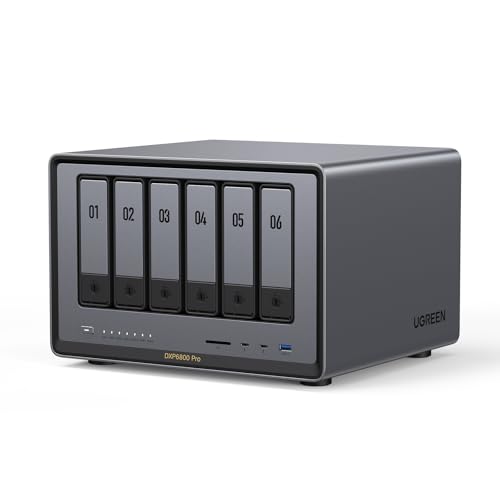
Where a studio edits from the archive rather than merely storing on it, the connection and the extras start to matter as much as the bays. The DXP6800 Pro listing leads with a ten-core Intel processor, dual 10GbE ports and two M.2 NVMe slots alongside its six SATA bays, plus an 8K HDMI output and two Thunderbolt 4 connections in the title. That combination suits a busier desk: several machines reaching the same library, a large catalogue that gets browsed rather than deep-archived, and an owner who wants the option of connecting the box directly to a display in the office.
Specs
- Product name from listing: UGREEN NASync DXP6800 Pro 6-Bay Desktop NAS
- Processor from listing: Intel i5 1235u 10-Core CPU
- Memory from listing: 8GB DDR5 RAM
- System storage from listing: 128G SSD
- Network from listing: 2X 10GbE
- Additional slots from listing: 2XM.2 NVMe Slots, 6x SATA
- Display and connections from listing: 8K HDMI, 2XTBT4
- Supplied state: Diskless, Network Attached Storage
Best for: Studios that browse and work from the archive daily and have, or plan, faster than gigabit networking between desks.
Watch out for: The feature list is long, and features only help if the rest of the setup uses them; a studio on basic networking and a single edit machine will leave much of this specification idle.
ASIN: B0D22HN6PT
ASUSTOR Lockerstor 6 Gen2 AS6706T

The Lockerstor takes a different route to the same six bays. Its listing names four M.2 NVMe slots, which is twice the count in the UGREEN title, alongside dual 2.5GbE ports that the listing says can be upgraded to 10GbE, and 8GB of DDR4 memory. For a creator whose archive mixes stills with growing video material, that layout offers flexibility in how the internal slots get assigned, while the network speed starts at a level many studio switches already support. It is the choice for a buyer who reads spec sheets closely and wants the upgrade path written into the product name itself.
Specs
- Product name from listing: ASUSTOR Lockerstor 6 Gen2 AS6706T – 6 Bay NAS
- Processor from listing: Quad-Core 2.0 GHz CPU
- Additional slots from listing: 4X M.2 NVMe Slots
- Network from listing: Dual 2.5GbE, Upgradable to 10GbE
- Memory from listing: 8GB DDR4 RAM
- Intended use from listing: Content Creation Network Attached Storage
- Supplied state: Diskless
Best for: Creators who want the largest M.2 slot count of the three and a network setup that can start at 2.5GbE and grow later.
Watch out for: Reaching the faster network speed depends on the upgrade the listing mentions, so a buyer who needs that speed on the first day should budget the extra step rather than treating it as present from the box.
ASIN: B09VX449JG
Which One Fits Your Situation
You Are Consolidating a Decade of Loose Drives
Start with the Synology DS1621+. The job here is tidying, not expansion: copy each portable drive into a dated folder structure, retire the loose disks to a labelled shelf as a cold copy, and let one enclosure become the address everyone uses. Its plain six-bay, diskless listing matches a library that needs a home more than it needs features, and the empty bays give the next few seasons somewhere to land without another reorganisation.
Two or Three People Edit From the Same Library
Choose the UGREEN NASync DXP6800 Pro. Shared access is where its listed dual 10GbE ports and ten-core processor stop being decoration, because several machines pulling previews and full-resolution files at once is a different workload from one photographer archiving at night. Place it on the studio switch, give each editor the same folder structure, and let the archive become the working library rather than a place files visit after the job closes.
Your Shoots Now Include a Lot of Video
Look at the ASUSTOR Lockerstor 6 Gen2 AS6706T. Video stills, frame grabs and project files inflate a library faster than stills alone, and the four M.2 slots in its listing give the most internal flexibility of this group. Its 2.5GbE starting point also suits a studio that has upgraded the edit desks but not yet the whole network, with the listed path to faster networking kept open for the next round of changes.
The Archive Is Also Your Client Delivery Point
Any of the three can hold the finished folders, but the deciding factor is habit rather than hardware. Pick the model that matches your network today, then set one shared delivery folder, one naming rule and one retention rule, and keep them unchanged. A delivery archive fails through inconsistent folders far more often than through the enclosure, so the best choice is the one the whole studio will actually keep tidy.
Common Mistakes
- Filling all six bays on the first day, leaving no empty slot for the season when a camera upgrade doubles file sizes.
- Treating the NAS as the only copy of client work, with no second copy on a separate device or off site.
- Buying network speed on the enclosure while the switch and cables in the studio still limit every transfer.
- Moving drives across without a folder and naming plan, so the new archive inherits the mess of the old portable disks.
- Forgetting that all three models are sold diskless, and budgeting for the enclosure alone when drives are still needed.
Frequently Asked Questions
How many drives should go into a six-bay archive at first?
Populate only the bays the current library needs, and keep at least one bay empty for growth. Starting diskless enclosures with a smaller set of drives makes the initial copy manageable, leaves room for a larger season, and avoids a full box that has to be rearranged the first time the library expands beyond its first plan.
Does a photography archive need faster than gigabit networking?
Only when the desk actually works from the archive. A photographer who copies finished shoots across at night will rarely notice standard networking, while a studio where two editors browse the same catalogue all day can feel the limit quickly. Match the enclosure ports to the switch and machines already in place rather than buying speed nothing else can use.
Can existing drives from portable enclosures move into one of these?
Physically, drives of the right size can be installed, but moving a drive into a NAS normally means preparing it for that system, which erases what is on it. Copy the library to a safe temporary home first, install and set up the drives, then copy everything back into the new folder structure before wiping or retiring the old disks.
Is one six-bay NAS enough protection for client work on its own?
No single box is a complete protection plan, however many bays it has. Redundancy inside the enclosure guards against one drive failing, but fire, theft or a serious fault can still take the whole unit. Keep a second copy of finished client work on a separate device, and ideally in a separate place, on a schedule that runs without anyone remembering.