Our Short List of 3
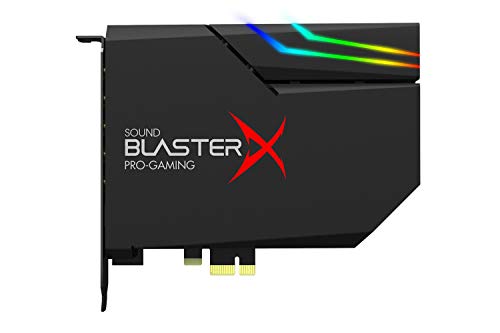
- Best for: Desktop gamers who want both encoders plus a hi-res DAC in a single slot.
- Playback: up to 32-bit / 384 kHz via SABRE32 Ultra-class DAC
- Signal-to-noise: 122 dB DNR
- Encoding: Dolby Digital Live and DTS
- Surround: 5.1 discrete for speakers, 7.1 virtual for headphones
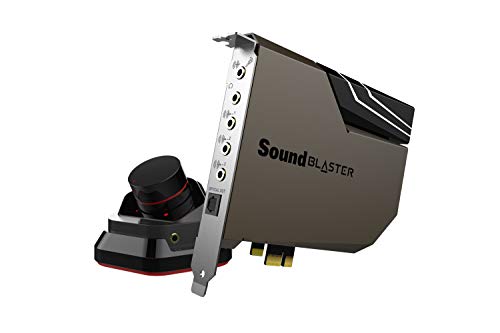
- Best for: Headphone-first listeners who also send encoded surround to a receiver.
- DAC: ESS SABRE-class 9018, 127 dB DNR
- Playback: 32-bit / 384 kHz PCM and DSD64
- Encoding: Dolby Digital Live and DTS Connect over optical out
- Surround: 5.1 discrete for speakers, 7.1 virtual for headphones

- Best for: Gamers who want both encoders and microphone tools without stepping up to the AE line.
- Audio processor: Sound Core3D
- Playback: up to 24-bit / 192 kHz, 116 dB SNR
- Encoding: Dolby Digital Live and DTS Connect
- Surround: 5.1 discrete for speakers, 7.1 virtual for headphones
All 4 Picks at a Glance
| Product | Specs | Action |
|---|---|---|
| Creative Sound BlasterX AE-5 Plus |
| Check price on Amazon |
| Creative Sound Blaster AE-7 |
| Check price on Amazon |
| Creative Sound Blaster Z SE |
| Check price on Amazon |
 Creative Sound Blaster X4 |
| Check price on Amazon |
Key takeaways
- Compare four PC sound cards that encode Dolby Digital Live or DTS Connect in real time, with DAC figures, channel counts and connections from the listings.
The deciding question with a PC sound card is rarely raw fidelity. It is whether the card can take the multichannel audio a game generates and encode it, in real time, into a Dolby Digital or DTS bitstream your receiver understands over a single optical cable. Most onboard audio sends only two channels down that cable, so a 5.1 speaker set stays quiet at the back. Cards that carry Dolby Digital Live or DTS Connect encoding fix that gap, and the listings below were picked because each one names that encoding support in its product details.
This roundup is for desk-based players running an AV receiver or powered 5.1 speakers, for home-theater PC owners whose receiver predates HDMI eARC on the PC side, and for headphone users who want virtual surround from the same device. Every pick was chosen from the names and specifications printed on its Amazon listing, with encoding support, converter figures and connection lists checked line by line rather than assumed from the brand family.
Quick Picks
As an Amazon Associate we earn from qualifying purchases
| Product | Best for | Key spec from title |
|---|---|---|
| Creative Sound BlasterX AE-5 Plus | Gamers who want both encoders and a hi-res DAC in one slot | 32-bit/384 kHz, 122 dB SNR |
| Creative Sound Blaster AE-7 | Headphone listeners who also feed a receiver | 127 dB DNR, ESS SABRE-class 9018 DAC |
| Creative Sound Blaster Z SE | A simpler internal card that keeps both encoders | 116 dB SNR, 24-bit/192 kHz |
| Creative Sound Blaster X4 | Laptops and desks with no spare PCIe slot | USB-C external, 7.1 discrete surround |
How to Choose
Start With the Encoding, Not the DAC
Dolby and DTS appear on many audio boxes, but the wording matters. A device can pass through a ready-made Dolby Digital track from a film yet still send game audio as two-channel stereo, because games generate their surround mix live as uncompressed channels. Dolby Digital Live and DTS Connect are the two real-time encoders that compress that live mix into a bitstream a receiver accepts over optical. When you read a listing, look for one of those two names in the specification list. Anything vaguer, such as a general surround badge, does not guarantee your games will light up every speaker.
Decide Between a Slot and a USB Port
An internal card disappears into the case and takes its power from the PCIe slot, which suits a fixed desktop with a spare x1 slot and room below the graphics card. Its sockets live on the rear bracket, so cable swaps mean reaching behind the machine. An external box such as the Sound Blaster X4 sits on the desk instead, connects over USB-C, and moves between a desktop and a laptop in seconds. That flexibility helps shared desks and small-form-factor builds with no free slot, while a tower that never moves usually gains nothing from the extra desktop hardware.
Read the Converter and Amp Figures Together
Listings headline two figures: the converter resolution, such as 24-bit/192 kHz or 32-bit/384 kHz, and a signal-to-noise or dynamic-range number in decibels. Higher decibel figures mean a quieter background behind dialogue and game effects, and the gap between 116 dB and 127 dB is audible on sensitive headphones. The amplifier section matters just as much for headphone users. Check the supported impedance range, which reaches 600 ohms on every card here, and the output impedance, where a low figure near 1 ohm keeps frequency response even on sensitive in-ear models and multi-driver headsets.
Count the Connections Your Setup Really Uses
The encoder only helps if the physical path exists. Feeding a receiver means an optical output on the card and an optical input on the receiver, and all four picks here carry that TOSLINK socket. Analog 5.1 speakers need three 3.5 mm jacks for front, rear and center/subwoofer channels, which the internal cards provide. Players who also capture or stream should note the microphone input, the mic EQ presets on the Z SE, and ASIO support for low-latency recording. Finally, the encoders are switched on inside the maker’s software, so confirm the current app supports your Windows version before ordering.
The 4 Best Options
Creative Sound BlasterX AE-5 Plus
- Best for: Desktop gamers who want both encoders plus a hi-res DAC in a single slot.
- Playback: up to 32-bit / 384 kHz via SABRE32 Ultra-class DAC
- Signal-to-noise: 122 dB DNR
- Encoding: Dolby Digital Live and DTS
- Surround: 5.1 discrete for speakers, 7.1 virtual for headphones
Desktop gamers who want both encoders plus a hi-res DAC in a single slot.
The earlier AE-5 without “Plus” in the name lacks the Dolby and DTS encoding, so check the listing title carefully before ordering.
The AE-5 Plus is the natural first look for a desktop gamer who wants one card to handle everything: real-time encoding for the receiver, discrete analog outputs for powered speakers, and a strong headphone stage for late sessions. Its SABRE32 DAC figure of 122 dB sits above the Z SE below, and the Xamp bi-amp drives each earcup from its own amplifier stage, which helps with demanding planar and high-impedance headphones. The RGB lighting and included strip will not suit every build, but functionally this is the most complete internal package in the group.
Creative Sound Blaster AE-7
- Best for: Headphone-first listeners who also send encoded surround to a receiver.
- DAC: ESS SABRE-class 9018, 127 dB DNR
- Playback: 32-bit / 384 kHz PCM and DSD64
- Encoding: Dolby Digital Live and DTS Connect over optical out
- Surround: 5.1 discrete for speakers, 7.1 virtual for headphones
Headphone-first listeners who also send encoded surround to a receiver.
The control module needs desk space and its own cabling, and the card skips the RGB lighting some builders expect at this level.
Choose the AE-7 when headphones carry most of your listening and the receiver feed is the second job. Its ESS SABRE-class 9018 converter posts the highest figure here at 127 dB, with DSD64 playback alongside the usual PCM resolutions, and the same Dolby Digital Live and DTS Connect encoding as the AE-5 Plus for the optical path. The bundled Audio Control Module puts a large volume knob and microphone input on the desk, which suits streamers and frequent callers. There is no lighting, and the module’s cables add rear-panel clutter to plan around.
Creative Sound Blaster Z SE
- Best for: Gamers who want both encoders and microphone tools without stepping up to the AE line.
- Audio processor: Sound Core3D
- Playback: up to 24-bit / 192 kHz, 116 dB SNR
- Encoding: Dolby Digital Live and DTS Connect
- Surround: 5.1 discrete for speakers, 7.1 virtual for headphones
Gamers who want both encoders and microphone tools without stepping up to the AE line.
Analog output tops out at 5.1, so a 7.1 speaker system only gets virtual treatment on headphones, not discrete channels.
The Z SE keeps the two features this category exists for, Dolby Digital Live and DTS Connect encoding, and trims the converter specification to 116 dB and 24-bit/192 kHz to sit below the AE cards. For many speaker setups that trade is invisible, because the receiver does the final conversion anyway. What the Z SE adds instead is communication polish: microphone EQ presets, gaming profiles tuned per title, and ASIO support for recording. It is the sensible internal pick when the encoded optical feed matters more than the last word in headphone fidelity.
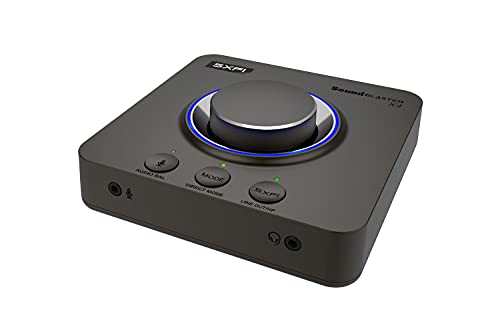
Creative Sound Blaster X4
- Best for: Laptop and small-form-factor owners who need encoded surround without opening a case.
- Interface: USB-C, bus powered, for PC and Mac
- Playback: 24-bit / 192 kHz, 114 dB dynamic range
- Encoding: Dolby Digital Live (Windows) over optical out
- Surround: up to 7.1 discrete for speakers, Super X-Fi for headphones
Laptop and small-form-factor owners who need encoded surround without opening a case.
Dolby Digital Live encoding is a Windows feature here and there is no DTS encoder, so DTS-only setups should pick an internal card.
The X4 moves the same trick outside the case. It connects over USB-C, draws its power from the bus, and encodes Dolby Digital Live for Windows over its optical output, so a laptop or a compact PC with no free slot can still feed a receiver proper surround from games. Around that core it adds Super X-Fi headphone processing, discrete 7.1 analog outputs, optical input for a console, and the SmartComms Kit for cleaner call audio. The trade is on the DTS side: unlike the three internal cards, the X4 lists no DTS encoding.
Which One Fits Your Situation
Your Receiver Only Has an Optical Input
Older receivers and many soundbars take surround only through optical, and that single cable carries two uncompressed channels unless the PC encodes the rest. Any pick here solves it, because all four encode in real time over TOSLINK. The AE-5 Plus is the default desktop choice, while the X4 covers the same ground for a laptop-based theater setup.
Headphones Most Nights, Speakers on Weekends
If a headset does the weekday work and the speaker system only wakes up for films and co-op sessions, the AE-7 fits best. Its converter figure leads this group, the control module keeps volume and microphone within reach, and switching between headphone and speaker output happens in the Sound Blaster Command software rather than by swapping cables at the back of the case.
A Compact PC or Laptop With No Spare Slot
Small-form-factor cases often give the only expansion slot to the graphics card, and laptops have no slot at all. The X4 sidesteps the problem entirely over USB-C, needs no power brick, and still delivers encoded Dolby Digital Live to a receiver plus discrete 7.1 outputs for powered speakers. It is also the easiest pick to move between two machines.
You Stream or Take Calls While You Play
Voice quality is where the Z SE earns its place. Its microphone EQ presets and per-game profiles tidy up chat audio without extra software, and ASIO support keeps recording latency low for capture tools. If your streaming machine is a laptop, the X4 answers with its SmartComms Kit, which adds automatic muting and two-way noise cleanup for calls.
Common Mistakes
- Assuming any Dolby or DTS mention means live encoding, when only Dolby Digital Live and DTS Connect compress game audio in real time.
- Buying the original Sound BlasterX AE-5 and discovering the Plus model’s encoders are missing from that earlier card.
- Turning the encoder on and then listening through analog cables, which bypass the encoded path entirely; encoding only travels over the optical output.
- Leaving onboard audio set as the Windows default device, so games keep sending their sound to the motherboard instead of the card.
- Judging a card on its decibel figure alone while ignoring output impedance, which shapes how sensitive earphones respond.
Frequently Asked Questions
What does Dolby Digital Live actually do?
It takes the multichannel sound a game or app produces, up to 5.1 channels, and compresses it in real time into a Dolby Digital bitstream that travels over a single optical cable. Without it, that same cable carries only two channels from games, so rear speakers stay silent. It is an encoding job, done live on the card.
How is DTS Connect different from Dolby Digital Live?
Both do the same job for different codec families. Dolby Digital Live encodes into the Dolby format, while DTS Connect encodes into DTS and can upmix stereo sources through its companion processing. Most receivers accept both, so the practical choice is simple: pick the encoder your receiver confirms it decodes, and treat having real-time encoding at all as the bigger win.
Do these cards help with films and streaming shows too?
Partly. Films and shows that already carry a Dolby or DTS track can pass that track through unchanged, so the card adds little there. The gain appears with content the PC renders as multichannel PCM, which includes most games and some apps, plus the virtual surround processing these cards apply to headphones for late-night viewing.
My motherboard already has an optical output. Why add a card?
The socket alone does not encode. Most onboard optical outputs send film tracks through but leave games as two-channel PCM, because the real-time Dolby and DTS encoders are licensed features board makers usually skip. A card adds that encoding, plus a quieter converter, a stronger headphone amplifier and better microphone handling than the typical onboard codec provides.